GK222 Official Sign In — Account Login

Your GK222 account is the gateway to 19,000+ games, BDT deposits via bKash and Nagad, VIP rewards and 24/7 support. Login takes under 30 seconds - via phone number on the website, mobile app, or social accounts. This guide covers every login method, password recovery, and account security so you stay in control of your profile at all times.

How to Sign In to GK222

GK222 uses a phone-based authentication system. Your mobile number is your primary identifier - not an email or username. This approach is standard for Bangladeshi platforms and works seamlessly with local OTP delivery.

Login methods available:

  • Phone number + password (main method)
  • Facebook account (OAuth)
  • Google account (OAuth)
  • Saved session on mobile app (auto-login after first entry)

The same credentials work across the website (gk222.io) and the Android app - no separate logins needed.

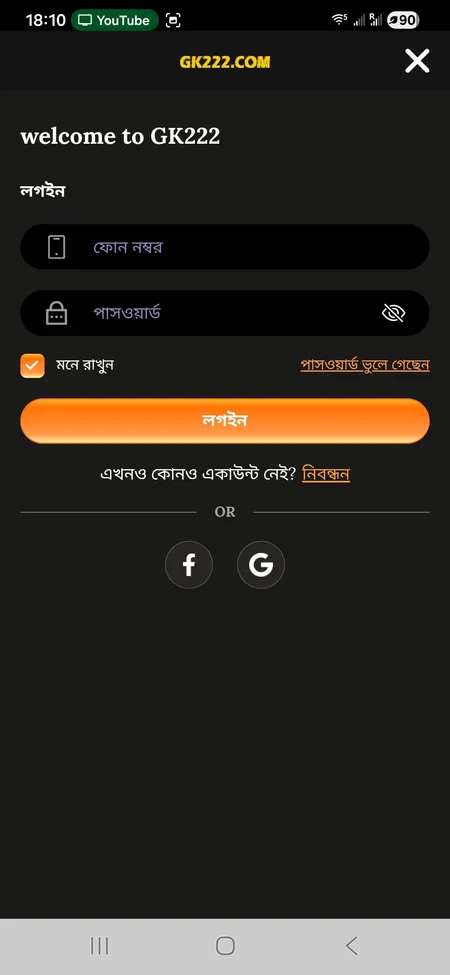
GK222 login form with phone and password fields

The GK222 login screen: phone number field, password, Remember me toggle, Forgot password link, and social sign-in via Facebook and Google.

Step-by-Step Login Process

Follow these steps to access your account on the GK222 website or app:

  1. Open gk222.io or launch the GK222 app on your Android device.
  2. Tap the Login button in the top-right corner of the screen.
  3. Enter your registered phone number in the first field.
  4. Enter your password in the second field.
  5. Toggle Remember me if you want the session saved on your device.
  6. Press the Login button to authenticate.
  7. If credentials are correct, you land directly on the home screen with your balance visible.

For Facebook or Google login, tap the respective icon on the login screen. You will be redirected to the social provider authorization page and returned to GK222 automatically after approval.

Open GK222 Account

Where to Find the Login Button

The login entry point is consistent across all access points:

Access Point Login Button Location
Website (gk222.io) Top-right corner of the header
Side hamburger menu Listed as first action item
Mobile app Top-right of the main screen
Bottom navigation Profile tab redirects to login
Direct URL gk222.io opens the login modal

On mobile, the bottom bar shows Profile - tapping it when logged out opens the login form instantly.

Login via the GK222 App

The Android app offers the fastest login experience. After you enter your credentials the first time and tick Remember me, subsequent sessions open automatically without re-entering your password.

Key app login advantages:

  • Persistent session across app restarts
  • One-tap access from the home screen
  • Balance synced in real time with the web version
  • Notifications for bonuses and reward deadlines

You can download the GK222 app from the official site or the Telegram channel GK222OFC. Installation requires enabling 'Unknown sources' in Android settings, which takes about 10 seconds.

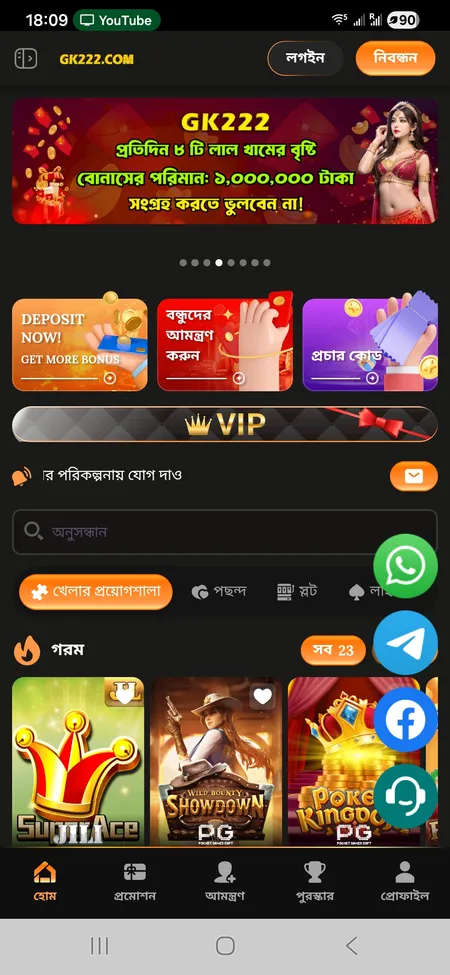
GK222 app home screen after login

After login the home screen shows your BDT balance, VIP level, active promotions and the full game catalog.

Get the GK222 App

Password Recovery

If you forgot your password, GK222 recovery works through the 24/7 support team - not an automated email link. Here is what to do:

  1. On the login screen, tap Forgot password.
  2. You will be prompted to contact customer support.
  3. Reach the team via Online Chat, WhatsApp, or Telegram (channel: GK222OFC).
  4. Provide your registered phone number and identity confirmation.
  5. Support will verify your identity and issue a password reset.

There is no self-service email reset flow - all recovery goes through support agents. Response time is typically a few minutes given the 24/7 operation.

Important: GK222 will never ask you to send money via Telegram or Facebook direct messages during recovery. Any such requests are fraud attempts.

Never share your login password or transaction password with anyone claiming to be GK222 support in a private chat. Official support operates only through the channels listed in the Help Center.

Common Login Problems and Fixes

Problem Likely Cause Fix
'Incorrect password' error Wrong password or caps lock Re-enter carefully; use recovery if needed
Page not loading ISP block on the domain Try an alternative mirror like gk222.com
App crashes on login Outdated APK version Re-download the latest APK from the official site
OTP not received Network delay or wrong number Wait 60 seconds; contact support
Account locked Multiple failed attempts Contact 24/7 support to unlock

If the main domain gk222.io is inaccessible, GK222 maintains several mirror domains including gk222.com, gk222com.com and gk222vip.com - they share the same backend and your credentials work on all of them.

Go to GK222 Now

Account Security After Login

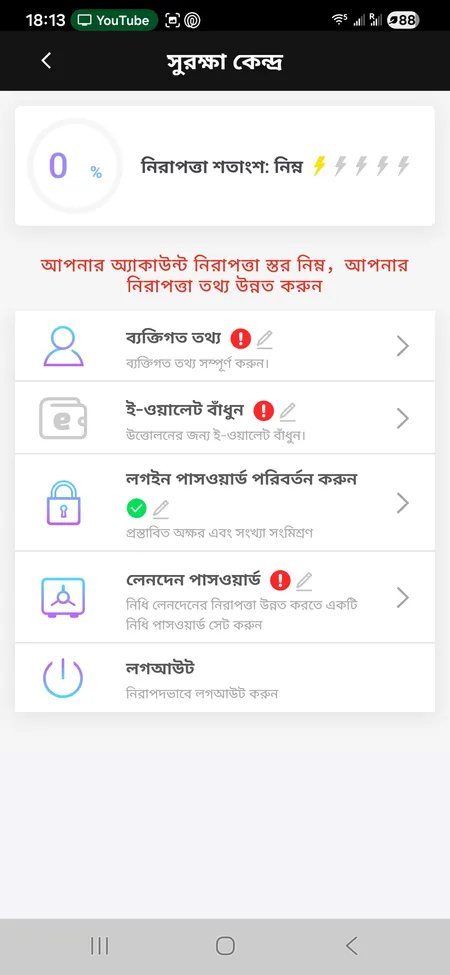
GK222 includes a dedicated Security Center (সুরক্ষা কেন্দ্র) accessible from the profile menu. It displays a security percentage score and covers:

  • Personal Information - name, phone, email, social IDs
  • Bind E-Wallet - link bKash or Nagad for withdrawals
  • Change Login Password - update your main password anytime
  • Transaction Password - separate PIN for financial operations
  • Logout - end your session on the current device

Setting a Transaction Password adds a second authentication layer for deposits and withdrawals - this effectively acts as an in-app 2FA for financial actions. OTP is used during registration and account recovery for identity verification.

GK222 Security Center screen

The Security Center shows your account protection level and lets you bind an e-wallet, change passwords and manage personal data.

What You Can Do After Logging In

Once inside your account, the full platform is available through the Member Center (সদস্য সেন্টার):

  • Deposit - top up via bKash VIP or Nagad VIP from BDT 100
  • Withdraw - send funds to your linked e-wallet
  • Betting Record - full history of all wagers
  • Profit and Loss - net results by period
  • Reward Center - collect daily sign-in bonuses, red envelopes, rebates
  • VIP Status - check your current level (VIP0 to VIP50) and upcoming upgrade bonus
  • Invite Friends - generate your referral link and track commissions
  • Mission - active challenges with BDT prizes

The top bar always shows your current BDT balance with a refresh button, your User ID, and VIP level badge.

GK222 accounts are protected by Cloudflare DDoS mitigation and SSL issued by Google Trust Services. Your session data is encrypted in transit at all times.

Login, KYC and Withdrawals

GK222 links your account name to your payment method. Before your first withdrawal, make sure:

  • The Full Name in your profile matches the name on your bKash or Nagad account.
  • If the names differ, the withdrawal request will be rejected.
  • KYC document upload (NID or passport) may be required when identity confirmation is needed.

This rule exists to prevent fraud and protect your funds. Setting your full name correctly at registration saves time later. You can edit it in My Account under the profile settings section.

For a full walkthrough of the platform, visit the GK222 main page where the complete feature overview is available.

FAQ: GK222 Login

What do I use to log in - phone, email or username?

GK222 uses your registered phone number as the login identifier. Email and username fields are optional profile additions - only the phone number and password combination works for authentication.

Can I log in with Facebook or Google?

Yes. The login screen has buttons for Facebook and Google OAuth. Tap the icon, authorize on the provider page and you return to GK222 automatically. The same social account must have been used at registration.

My password is not working - what should I do?

First check that caps lock is off and you are entering the correct number. If the problem continues, tap 'Forgot password' on the login screen and contact 24/7 support via Online Chat or Telegram (GK222OFC) to reset it.

Which domains can I use to log in?

Your credentials work on gk222.io, gk222.com, gk222com.com, gk222vip.com and other official mirrors. All share the same backend so your balance and history are identical everywhere.

Does the app remember my login?

Yes. If you tick 'Remember me' during login in the Android app, the session is saved and you do not need to re-enter your password on subsequent opens. Clearing the app cache or uninstalling will end the saved session.

How do I reset my transaction password?

Go to Security Center in the side menu, select 'Transaction Password' and follow the verification steps. If you are locked out, contact support with your phone number for manual assistance.

Can I be logged in on multiple devices at the same time?

GK222 does not explicitly restrict concurrent sessions in public documentation, but using multiple accounts from one phone number or IP is flagged as fraud. One account per person is the platform rule.

What happens if I enter the wrong password several times?

Repeated failed attempts can trigger a temporary account lock. Contact 24/7 support via Online Chat or WhatsApp to unlock your account - typically resolved within minutes.

Is my login data encrypted?

Yes. GK222 uses SSL certificates from Google Trust Services and routes traffic through Cloudflare. All data sent between your device and the server is encrypted in transit.

How do I log out securely?

Open the side menu or Profile section and tap 'Logout' (লগআউট). This ends your current session. For added security, the Security Center also contains a logout option that clears your active session.

Ready to access your GK222 account? Sign in now and check your balance, active bonuses and today's game catalog.