GK222 Official App — Get It on Android

The GK222 mobile app brings the full casino and sportsbook experience to your phone - 19,000+ games, bKash and Nagad payments, live casino with HD dealers, and a BDT 18 welcome bonus just for registering through the app. The interface is fully localized in Bengali, works on Android via APK and on iOS as a PWA, and keeps your balance and rewards in sync with the web version. One account, one login, instant access from anywhere in Bangladesh.
Why the GK222 App is Better Than the Browser

The GK222 app loads faster than the mobile browser version because it skips DNS lookup and caches game assets locally. You get a cleaner Bengali-language interface, push notifications for Red Envelope Rain schedule (12 waves daily), and immediate access to the Reward Center without extra navigation steps.

Key differences from the desktop site:

  • Welcome bonus BDT 18 - credited only for registrations completed through the app
  • Instant deposit shortcuts - bKash VIP and Nagad VIP buttons appear on the home screen
  • Floating support buttons - WhatsApp, Telegram and live chat always visible
  • Security Center access - bind e-wallet, set transaction password and update personal data in one tap
  • Synchronized balance - the same account works on web and app simultaneously

The app package ID is prod.app_gk22bdtf6.com, with versions updated in early 2026. GK222 is not listed on Google Play or the Apple App Store - installation goes through the official domain or the official download page.

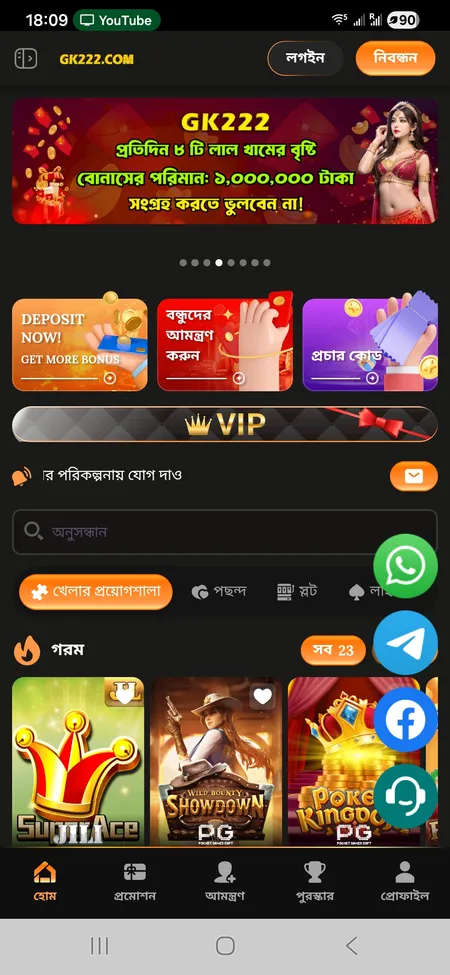
GK222 app main screen with hot games and deposit button

The GK222 home screen shows hot games, quick deposit access, and the daily Red Envelope Rain timer.

Get the GK222 App

How to Download and Install on Android (APK)

Google Play does not host GK222, so you install via APK. The process takes under two minutes on any modern Android device.

Step-by-step Android installation

  1. Open gk222.io in your mobile browser (or tap the app download link in the official Telegram channel GK222OFC).
  2. Tap the app download banner - the APK file (prod.app_gk22bdtf6.com) begins downloading immediately.
  3. Open your phone Settings, go to Security or Privacy, and enable Install from unknown sources for your browser app.
  4. Open the downloaded APK from your notifications bar or file manager.
  5. Tap Install and wait 10-15 seconds.
  6. Open GK222, tap Register or Login.

Common Android errors and fixes

Error Fix
Install blocked Enable 'Unknown sources' in Settings > Security
App not installed Free up at least 100 MB storage and retry
Parse error Re-download APK - the file may be corrupted
Login fails after install Check date/time settings on phone are correct
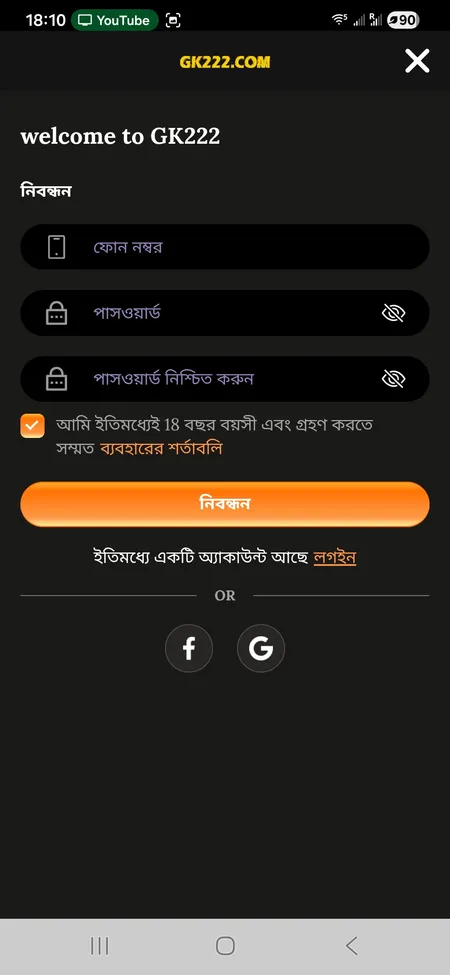
GK222 registration form inside the mobile app

Registration requires a phone number, password, and age confirmation (18+). Facebook and Google sign-in are also available.

iOS Installation: PWA Method

GK222 does not distribute a native .ipa file through the App Store. iOS users install via PWA (Progressive Web App), which creates a home screen icon that behaves like a native app.

Steps for iPhone and iPad:

  1. Open Safari and navigate to gk222.io.
  2. Tap the Share icon (box with arrow) at the bottom of the screen.
  3. Select Add to Home Screen.
  4. Name the shortcut GK222 and tap Add.
  5. The icon appears on your home screen - tap it to launch the full-screen app experience.

The PWA version supports all features: deposits, withdrawals, live casino, slots, missions and VIP rewards. Safari on iOS 16.4 and above handles PWA push notifications, so you can receive Red Envelope Rain alerts.

iOS PWA at GK222 supports all payment methods including bKash and Nagad, full game catalog access and Reward Center. No App Store approval needed - install takes under 60 seconds.

Open GK222 on iOS

System Requirements and Compatibility

Parameter Android iOS (PWA)
Minimum OS version Android 6.0+ iOS 13+ (Safari)
Recommended RAM 2 GB+ 2 GB+
Storage needed ~80 MB for APK None (PWA)
Internet 3G minimum, 4G recommended 3G minimum, 4G recommended
App stores Not available Not available

The app has been tested on popular Bangladesh market devices including mid-range Android handsets from Samsung Galaxy A-series, Xiaomi Redmi and Realme models. Screen resolution from 720p upward works correctly with the Bengali interface.

Registration and First Login Inside the App

After install, tap নিবন্ধন (Register) on the welcome screen. You need:

  • Mobile phone number (used as your permanent login ID)
  • Password and password confirmation
  • Age confirmation checkbox (18+)
  • Optional referral code

Alternatively, sign in with Facebook or Google using the social login buttons. GK222 supports OTP phone verification during registration. Once registered, the BDT 18 welcome bonus is credited automatically - this offer is exclusive to app registrations.

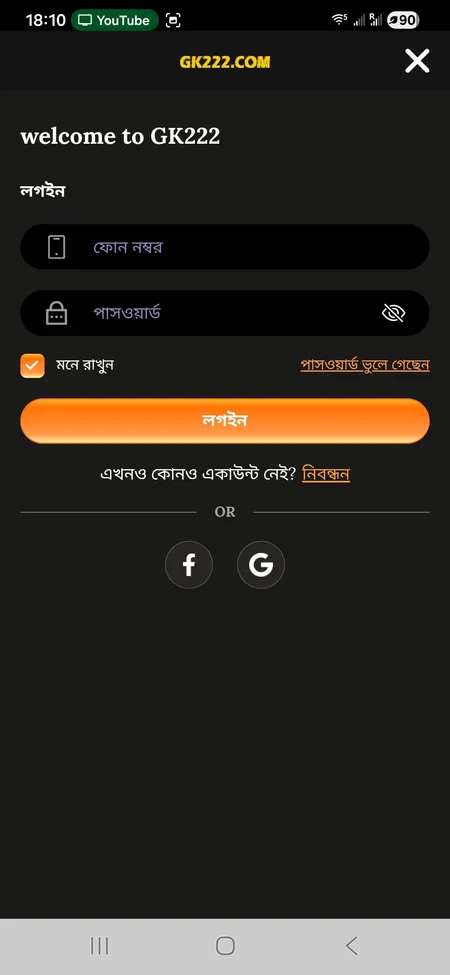
To log back in, go to GK222 login, enter your phone number and password. The 'Remember me' option keeps you logged in. If you forget your password, use the 'Forgot password' link or contact 24/7 support via Telegram or live chat.

One account works across app and browser - balance, VIP level, bonuses and betting history are all synchronized in real time.

GK222 login screen with phone and password fields

The login screen accepts phone number and password. Facebook and Google options are available for faster access.

App-Exclusive Bonuses and Reward Center

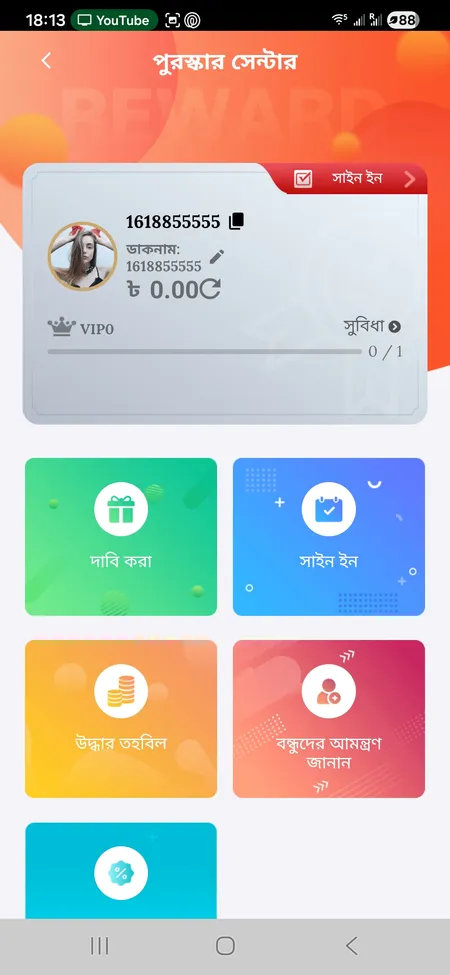
The GK222 Reward Center is built into the app's bottom navigation under পুরস্কার (Rewards). From there you claim:

  • BDT 18 registration bonus - one-time, new players only, app registration required
  • Daily Sign-In reward - tap Sign In each day to accumulate bonuses
  • Red Envelope Rain - 12 timed waves per day; maximum single session reward BDT 33,333; wagering requirement 2x
  • Dreamer's Fund - daily BDT 50,000 prize pool; spin count depends on VIP level (VIP1-3: 1 spin, VIP10-13: 5 spins, up to 10 spins for higher tiers)
  • e-Gambling Relief (cashback) - applies to losses on slots, fish games and video games; starts at 3% for losses above BDT 1 and scales to 30% for losses above BDT 5,000,000; wagering 1x

VIP progression starts at VIP1 (effective bet over BDT 2,000) and runs to VIP50, with automatic upgrade bonuses - no manual application needed.

GK222 Reward Center showing sign-in and claim buttons

The Reward Center shows your current balance, VIP level, daily Sign In button, and active bonus claims.

Claim Your App Bonus

Payments Inside the App

GK222 operates in BDT (Bangladeshi Taka). All deposits and withdrawals are processed through the same interface available in the browser.

Method Type Min Deposit Speed
bKash Mobile banking BDT 100 1-5 min
Nagad Mobile banking BDT 100 1-5 min
Rocket Mobile banking BDT 100 1-5 min
Upay Mobile banking BDT 100 1-5 min
Bank Transfer Bank BDT 100 Bank dependent

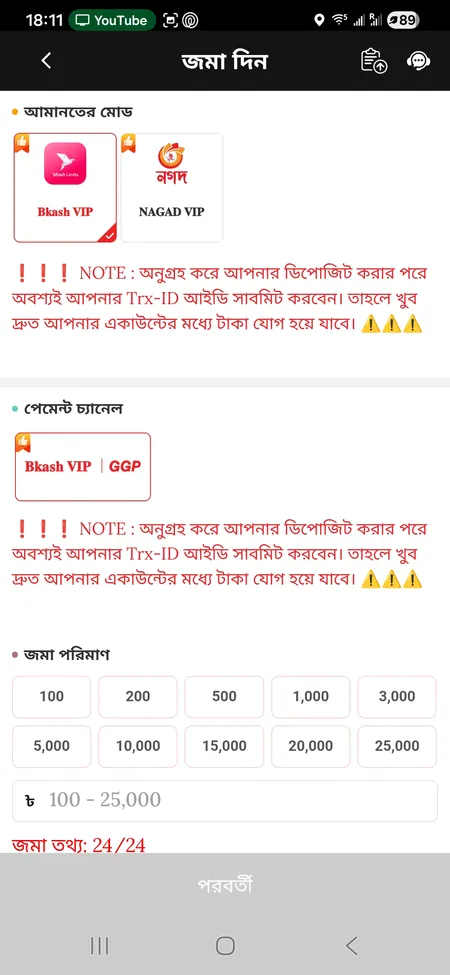
GK222 deposit form with bKash and Nagad options

Depositing via bKash or Nagad

In the app, go to Deposit, select bKash VIP or Nagad VIP as your method, enter the amount (BDT 100 to 25,000), and complete the transfer. Critically: submit your Trx-ID (transaction reference number) in the field shown in red. Without the Trx-ID the deposit will not be credited. Never send money through Telegram or Facebook links - only through the official app interface.

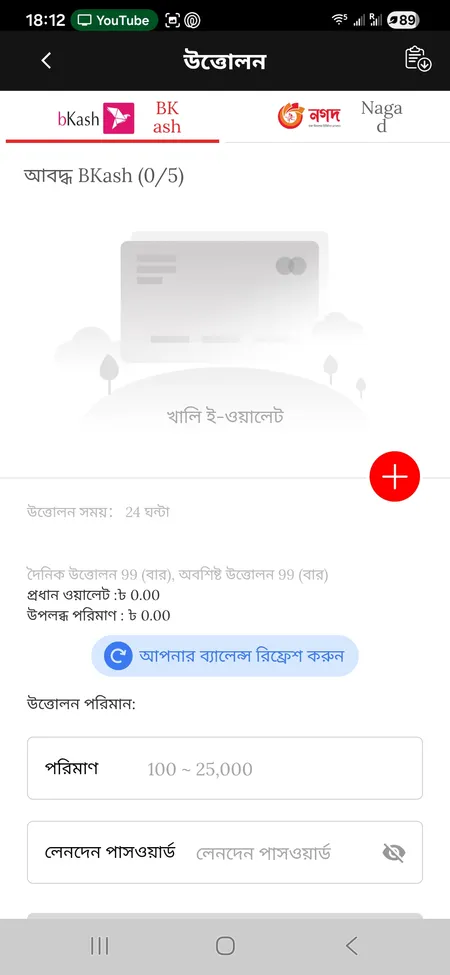
GK222 withdrawal form with e-wallet options

Withdrawing Funds

Go to Withdraw, select your linked bKash or Nagad e-wallet. Before your first withdrawal, bind your e-wallet in Security Center and ensure the full name in your profile matches your mobile banking account exactly. Mismatched names result in rejected withdrawals. Typical processing time is 1-5 minutes for e-wallets. Pending bonus wagering requirements block withdrawals until the rollover is complete.

Security Features in the App

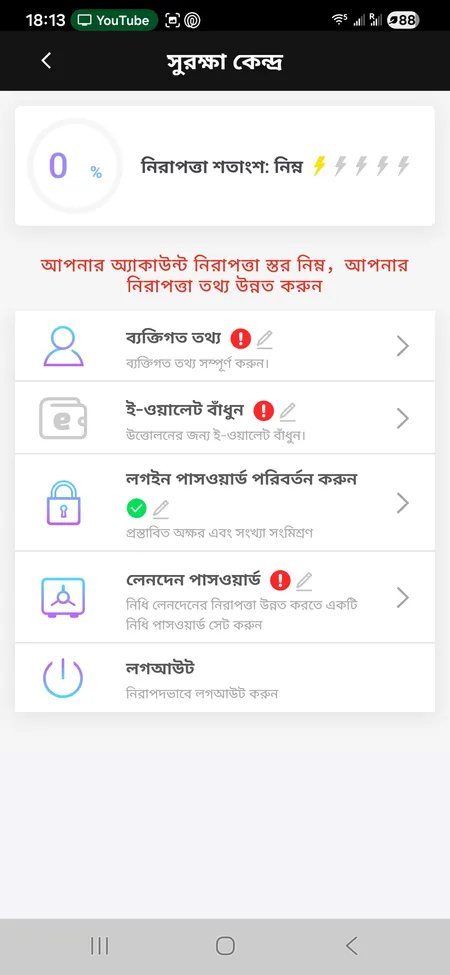
The GK222 app uses HTTPS with SSL issued by Google Trust Services and routes traffic through Cloudflare's network for DDoS protection and connection stability. Inside the app, the Security Center (সুরক্ষা কেন্দ্র) shows a security percentage indicator and lets you:

  • Update personal information
  • Bind your bKash or Nagad e-wallet for withdrawals
  • Change your login password
  • Set a separate Transaction Password for financial operations
  • Log out remotely

GK222 enforces a strict one-account-per-phone-number and one-account-per-IP policy. Duplicate accounts trigger automatic bonus cancellation and potential account suspension. OTP verification is used during registration and password reset. Do not transfer funds to anyone claiming to be GK222 support via personal messages - all legitimate transactions go through the in-app deposit screen.

GK222 Security Center showing protection level and e-wallet binding

Security Center displays your current security score and options to bind e-wallet, set passwords and manage personal data.

Games Available in the GK222 App

The app provides access to the full GK222 catalog of 19,000+ games across all categories. The GK222 games section includes:

  • Slots - JILI, PG Soft, Microgaming, YellowBat and more (Fortune Gems, Wild Bounty Showdown, Super Ace)
  • Crash games - Aviator by SPRIBE, FlyX by Microgaming
  • Live casino - baccarat, roulette, blackjack, sicbo with HD-stream dealers (EZDealer Roulette, Lucky 7 by Ezugi)
  • Fish games - arcade-style fishing games
  • Sports betting - Asian handicap, over/under, correct score, live in-play markets
  • Poker and lottery

The app home screen organizes games into Hot, Favorites, Slots and Live tabs. A search field lets you find any title directly.

All 19,000+ games are available inside the GK222 app. Download the APK for Android or set up the PWA on iOS and start playing with BDT 100 minimum deposit.

Updating the App

GK222 does not push automatic updates through a store. To update:

  1. Visit gk222.io or check the official GK222OFC Telegram channel for the latest APK link.
  2. Download the new APK file.
  3. Install over the existing version - your account data, balance and settings are preserved.
  4. No need to uninstall the old version first.

Check the Telegram channel periodically for update announcements, especially after major promotions or feature releases.

GK222 is not listed on Google Play or the Apple App Store. Any app claiming to be GK222 found in official stores is not from the platform. Always download from gk222.io or the link in the official Telegram channel GK222OFC.

FAQ: GK222 App

Where do I download the GK222 APK?

Download the APK directly from gk222.io or from the official Telegram channel GK222OFC. Do not use third-party APK sites - they may distribute modified files.

Why is the GK222 app not on Google Play?

GK222 distributes its Android app as a direct APK download. This is standard for online gaming platforms in the region. The app is not available on Google Play or the Apple App Store.

How do I install APK on Android?

Download the APK, then go to Settings > Security > Unknown Sources and enable installation from your browser. Open the downloaded file and tap Install. The process takes under a minute.

How does iOS installation work?

iOS users install GK222 as a PWA. Open gk222.io in Safari, tap Share, then Add to Home Screen. The icon works like a native app with full feature access.

What is the BDT 18 welcome bonus?

GK222 credits BDT 18 automatically when you complete registration through the mobile app. This bonus is for new players only and is not available via browser registration.

Can I use the same account on both app and browser?

Yes. Your GK222 account, balance, VIP level and bonuses are fully synchronized between the app and the browser version. Log in with the same phone number and password on any device.

What is the minimum deposit in the app?

The minimum deposit is BDT 100 via bKash, Nagad, Rocket or Upay. The deposit form inside the app has quick-select buttons from BDT 100 up to BDT 25,000.

Do I need to submit a Trx-ID after depositing?

Yes. After completing a bKash or Nagad transfer, you must submit the Trx-ID (transaction reference number) in the deposit form. Without it, the payment will not be credited to your account.

What should I do if the app crashes or does not open?

Force close the app, clear cache in your phone settings, and reopen. If the issue persists, re-download the latest APK from gk222.io. Contact 24/7 support via the live chat or Telegram GK222OFC if the problem continues.

How do I update the GK222 app?

Download the latest APK from gk222.io and install it over your existing version. No uninstall is required. Your data and balance are not affected by updates.